


What is Error retrieving information from server df dla 15?
Error retrieving information from server df dla 15 is an error that usually occurs when your Google Play Store has a problem.
How can you fix Error retrieving information from server df dla 15?
Some of the solutions to this error include synchronizing your Gmail account, turning on Date, Time and Timezone settings, clearing the cache of the Google Play Store and other services, and restoring your device to its factory settings.
Please see our in-depth walk-through solutions below.
Option 1. Use other Account
- Run Google Play Store.
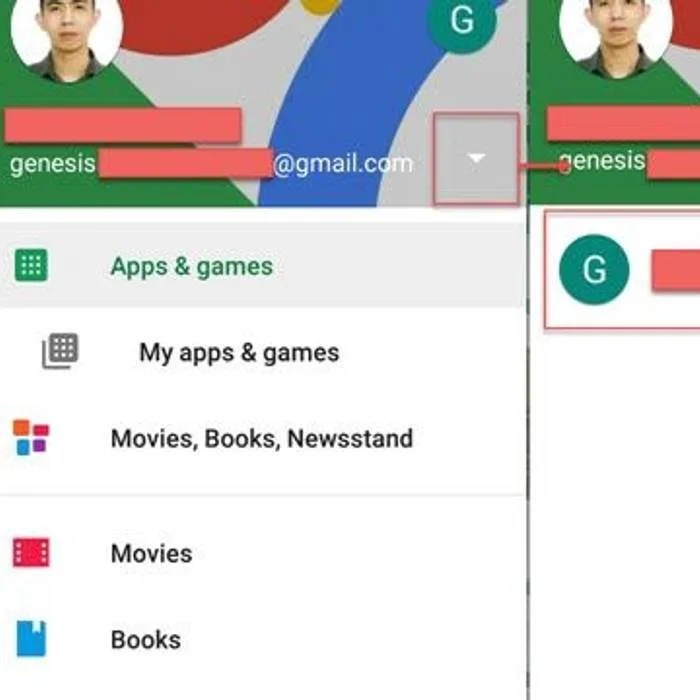
- Click the settings icon at the left side of the search bar. Please follow the image above.
- Click the arrow down, then click the secondary account.
- Then, try to update or download the application.
- If it was successful, you may go back to your primary account.
Option 2. Remove and Add Google account
- Go to Settinsg.
- Press Account.
- Select and press Google.
- Remove all Google Accounts.
- Add new Google account.
- Restart the device.
- Run Google Play Store.
-
Then, download the apps you want to install.
-
Go to Settings.
- Look for and click Date & Time.
-
Turn on Automatic date & time, and Automatic Time Zone.
-
Disconnect your internet connection.
- Go to settings.
- Look for Application.
- Look for Google play store and press Disable/Force to stop.
- Press clear cache and press Delete to confirm.
- Go back to application look for Google Play Services.
- Go to storage and press clear cache.
- Then press Manage storage, then press Clear All data, and then press OK to confirm.
- Now reconnect to your internet connection.
- Run Google Play Store accept the terms.
- Then, download the apps you want to install.
If the error persists, please included clearing the caches of these services Download Manager, Google Play Services, and Google Services Framework.
- Go to Settings.
- Look for Backup & Reset and press it.
- Press Factory data reset.
- Press Reset the device and then enter the password.
- Wait for your device to finish the restoration process.
- Run Google Play Store and accept the terms.
- Then download the apps you want to install.


