


What is error message ‘inaccessible boot device’ in Windows 10?
Inaccessible boot device is an error that usually occurs when the Windows operating system loses access to the system partition upon startup. When this occurs, the system usually shuts down to protect itself from possible corruption or loss of data.
How can you fix ‘inaccessible boot device’ in Windows 10?
Some of the solutions to this error include:
* Reconnecting the hard disk drive (HDD) or solid state drive (SSD)
* Checking the HDD or SSD for defects
* Resetting the PC
* Reinstalling Windows
Please see our in-depth walk-through solutions below.
-
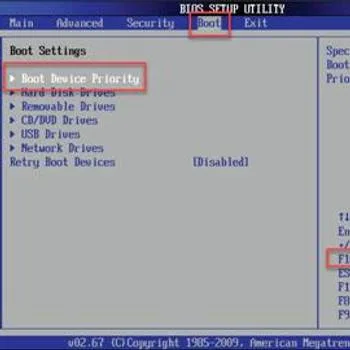
Turn on the PC, press the key to enter BIOS setup.
-
Go to the Boot tab, select Boot device priority and select the drive wherein Windows is installed.
- Press F10 and save.


See video below
https://youtu.be/BN4uwBDdcU8
SSD
For the SSD, let your computer standby in the BIOS for at least six hours so it can perform self-cleaning.
Reset PC
NOTE: Please reconnect the HDD where the Windows is installed and remove all secondary HDD and other storage devices such as USB storage device. Then, turn on the computer. If the error still persists, follow the instructions below.
- Insert the Windows 10 installation CD/DVD or USB.
- A message will appear “Press any key to boot from CD or DVD”, press any key to boot from the Windows installation CD/DVD or USB.
- Select your language, time and keyboard, and click Next.
- Click Repair your computer.
- Click Troubleshoot ==> Reset your PC ===> Remove Everything .
- Then, customize your Windows and input your other information.
Reinstall Windows
https://youtu.be/lunM4WOM97U

