


What is No longer in party due to network error?
No longer in party due to network error is an error that usually kicks out a user while playing the game.
How can you fix No longer in party due to network error?
Some of the solutions to this error include changing the Network Address Translation (NAT) settings, increasing internet connection stability, and correcting the Language and Location setting.
Please see our in-depth walk-through solutions below.
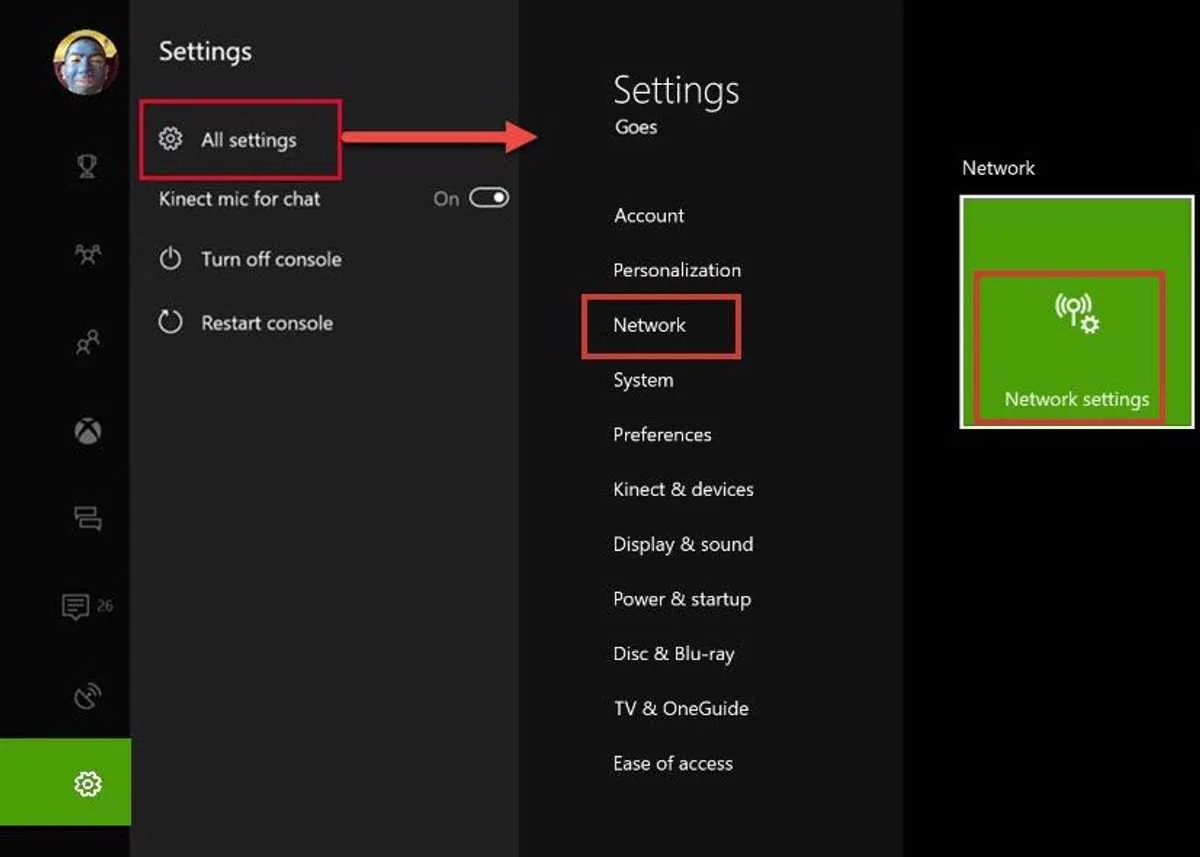
- Go to Settings.
- Select Network.
- Select Test multiplayer connection.
- Repeat until Nat type is changed to Open.
Option 1. Set IP and DNS address from the console
-
Go to Xbox One Network setting. Use Solution 1 as a reference.
-
Select IP setting and then select Manual. Set your IP.
- Select DNS Setting and then select Manual. Set your DNS, use Google DNS if you don’t have one.
Primary: 8.8.8.8
Secondary: 8.8.4.4
Option 2. Set IP and DNS address from the Modem/Router****
https://youtu.be/zmNgj5ThTiw
If you are still experiencing the error, you may want to call your Internet service provider. Ask them if they have a problem in your area. Also, ask if they can provide a DNS server dedicated for Xbox.
- Make sure to sign in first.
- Go to the Home screen
- Click Settings > All Settings.
- Select System and select Language & Location.
- Select the Location and Restart.


