


What is PS4 error su-30627-8?
PS4 error su-30627-8 is an error that usually occurs when the system software is corrupted.
How can you fix PS4 error su-30627-8?
Some of the solutions to this error include checking for System Software Update, rebuilding the database, testing your hard disk drive (HDD), and initializing PS4.
Please see our in-depth walk-through solutions below.
Option 1. Update using Safe mode
Step 1. Access Safe modeTo access Safe Mode see this YouTube video or refer below.
- Turn off the PlayStation 4.
- Connect your PlayStation 4 DualShock 4 controller using the USB cable.
- Press and hold the power button for at least seven seconds. The second beep is the indicator to release the power button,
- Press PS button on the controller.


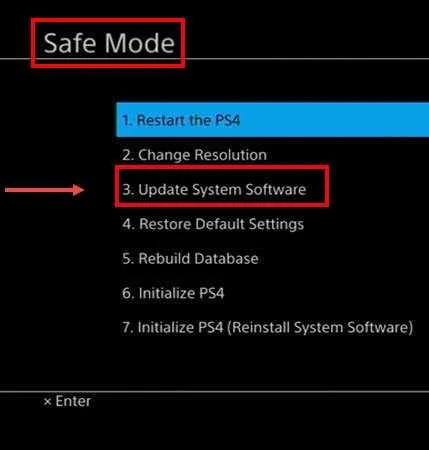
Step 2. Select Update System Software
- You should be able to access the safe mode. Please select Update System Software.
- If an update is available, update it. Wait until the process is over.
- Then, try playing again.
- If no update was found or the error persists after the software update, please see below.
Option 2. Manually install the system update
Step 1. Access Safe modeTo access Safe Mode see this YouTube video or refer to solution 1 step 1.
Step 2. Select Rebuild Database
-
You should be able to access the safe mode. Please select the Rebuild Database.
-
Then, try playing again.
If the error persists after the rebuilding your firmware, your hard drive may be faulty. Please see below.
If upon testing, a defect was found, send your PS4 to a service center for warranty claim. If the warranty is already void, buy a replacement on a computer with the same hard disk drive size.
If the hard drive is good, you may want to initialize your PS4.
NOTE: Restoring your device to factory defaults will erase all your data on the system. Please back up your saved files and other data. Please see below.
Step 1. Access Safe modeTo access Safe Mode see this YouTube video or refer to solution 1 step 1.
Step 2. Select Initialize PS4
- Select number 6 Initialize PS4.
- Wait for the process to finish.
- If the error persists, try again but select number 7 Initialize PS4.
If this fails, your PS4 may have a faulty hardware. Please bring it to a service center near you.

