


What is Windows 10 blue screen page fault in nonpaged area?
Windows 10 blue screen page fault in nonpaged area is an error that usually occurs when Windows cannot locate a file within the memory and results in blue screen of death (BSOD).
How can you fix Windows 10 blue screen page fault in nonpaged area?
Some of the solutions to this error include testing the random-access memory (RAM) using Windows Memory Diagnostic, uninstalling the driver, fixing the registry, testing hardware, and reinstalling Windows.
Please see our in-depth walk-through solutions below.
Windows Memory Diagnostic
Memtest86Another way to test a RAM
Option 1.


- Go to the Control Panel.
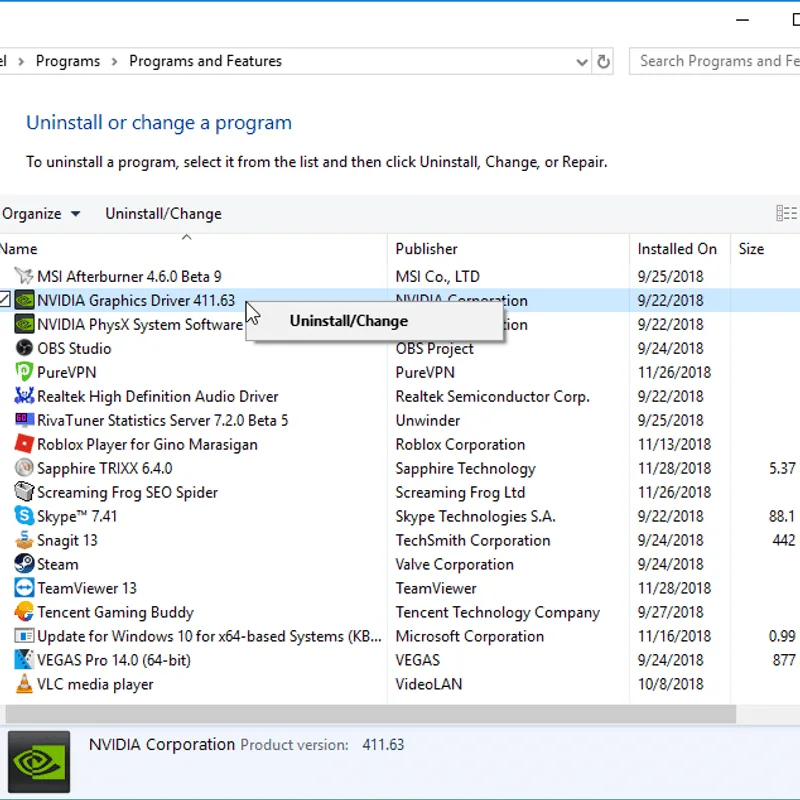
- Select Uninstall a program. Use the Search bar to make it appear.
-
Search for the newly installed driver.
-
Right-click it and select Uninstall.
- Restart the PC to apply the change.
Option 2.
- Go to the Control Panel.
- Select Device Manager. Use the Search bar to make it appear.
-
In the Device Manager window, look for the hardware which the driver is for.
-
Right-click the hardware and select Uninstall device.
- Restart the PC to apply the change.
Reset Windows 10
https://youtu.be/NWZ2-rYIiHQ
In some cases, a hardware failure may due to dust which results to overheating or a hardware was detached due to impact. Removing some parts and apply a general cleaning may fix it. Make sure to remove it first from the power source. Also, connect it properly to avoid semi-detached parts and cables.
Hard Disk Driver (HDD) test
NOTE: Use other working PC to provide an accurate result and avoid an unnecessary shutdown
Test hardware using BurnInTest
If “Windows 10 Blue screen page fault in nonpaged area” still persists even if all the components are in good condition. It is possible that the Window 10 has been damaged which it is not possible to be restored by Windows 10 Reset function. Reinstalling your Windows 10 might be the possible and only solution. Please be guided by the video below to install fresh Windows 10.

