


Windows 7 update error code 643 is caused by a missing or un-updated .NET Framework.
Contents:
- Windows Update Error 643 for NET Framework
- Program data Allow Full control
- Windows Update Error 643 for Microsoft Silverlight
1. Windows Update Error 643 for NET Framework
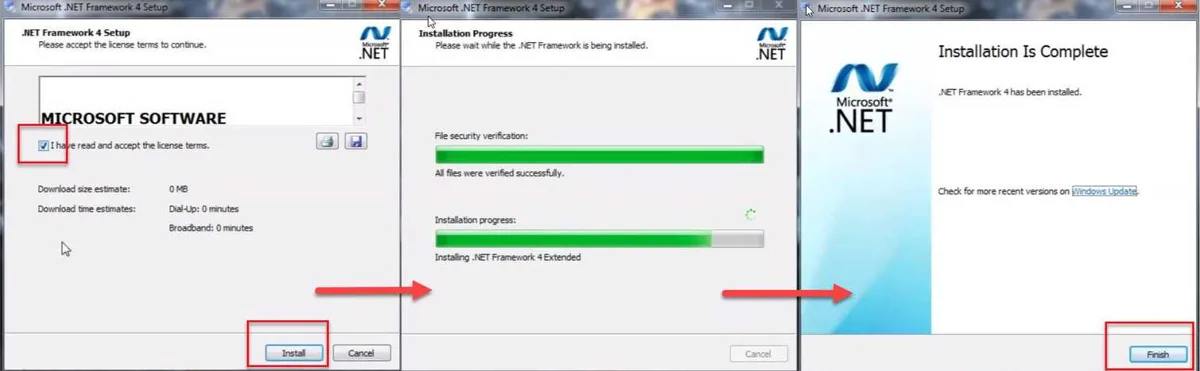
“Windows 7 update error code 643” could be caused by a missing .NET Framework. See instruction below on how to install the latest version. If you are having a hard time installing .Net Framework, use .Net Framework cleanup tool first before installing.

Image Credit: genesismarasigan / ErrorSolutions.tech
- If you have already installed the Net Framework, you need to uninstall it. By going to the Control panel. Select for NET Framework right click and uninstall.
- Go to https://www.microsoft.com/net/download/framework. Download the latest version of NET Framework.
- Then install.
- Then do a Windows Update.


.Net Framework Cleanup Tool
- Download and install.NET Framework Cleanup Tool by Microsoft, please see link https://msdnshared.blob.core.windows.net/media/2017/05/dotnetfx_cleanup_tool.zip
- Unzip it, then run the application.
- Confirm twice and then click Cleanup Now.
- Try installing your Microsoft Net framework again.
- Then do a Windows Update.
2. Program data Allow Full control
“Windows 7 update error code 643” could also be caused by a security setting of the Program data folder. See steps below to have a full access to Program data folder.

Image Credit: genesismarasigan / ErrorSolutions.tech
- Go to your C:\ drive, click the View tab and check Hidden items.
- Right-click ProgramData and select Properties.
- Click Security and then click Edit.
- Select your username account, and check all blank check box.
- Click Appy and Ok.
- Now, install your Microsoft Net framework.
- If the error still occurs, go to C:\ProgramData\Microsoft.
- Rename or delete the NetFramework folder.
- Try installing your Microsoft Net framework again.
3. Windows Update Error 643 for Microsoft Silverlight
“Windows 7 update error code 643” could be caused by a missing Microsoft Silverlight. See instruction below on how to install the Microsoft Silverlight.

Image Credit: genesismarasigan / ErrorSolutions.tech
- Install the latest Net framework as advice above (Solution 1).
- Then, download and install Microsoft Silverlight. Please see download link https://www.microsoft.com/en-us/download/details.aspx?id=53822.
- Click download and select your Windows 7 version.
- And then run Microsoft Silverlight.

