


What is ‘Windows error code 6’?
Windows error code 6 is an error that usually occurs when the device that is currently installed on your computer is competing for a resource that is already in use. You may need to assign the device driver to a unique computer resource.
You may see the error message, “The handle is invalid.”
How can you fix ‘Windows error code 6’?
Some of the common fixes include:
* Restarting Windows
* Reinstalling the latest graphics card driver
Please see our in-depth walk-through solutions below.
Windows error code 6 may be caused by cache or temporary files. You may shut down the PC for at least three minutes so cache or temporary files will be flashed out. Check if the error is fixed.
If the issue persists, you may need to upgrade your graphics card to meet the minimum requirement of that application.
For AMD graphics card, please see link here
For NVIDIA graphics card, please see link here
For Intel® HD Graphics driver, please see link here
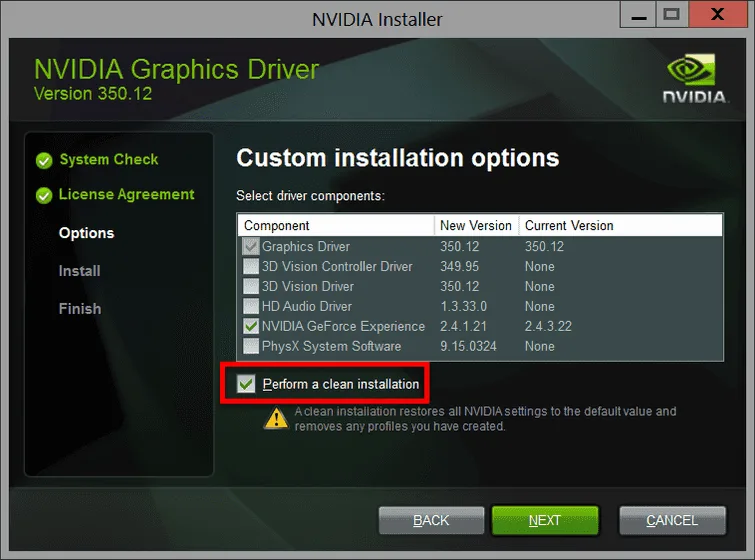
NOTE: When you are installing a graphics card driver, always enable or select Clean Install.
If the issue persists, you graphics card hardware might be faulty, which may be causing the problem. You may want to take your graphics card for warranty or replacement.


