


Windows update database error is an error that prevents Windows users from installing any updates
Contents:
1. Reset the Windows update components manually
Windows Update database may be due to some Windows Update component has encountered a problem or the services for Windows Update stop. You may want to reset the Windows Update components

Image Credit: genesismarasigan / ErrorSolutions.tech
Reset the Windows update components manually.
Recommended Reading


- Click Windows start type in CMD. Right click the Command prompt and run as admin.
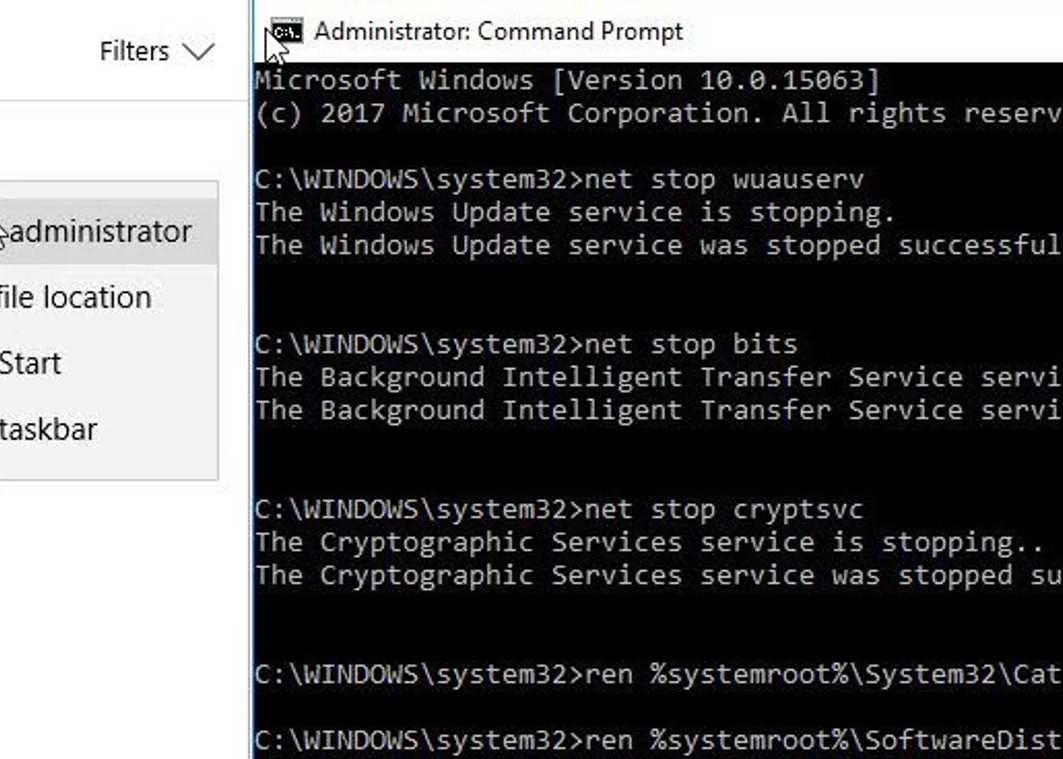
- Then, type in net stop wuauserv and then press Enter key.
- Next, type in net stop bits and then press Enter key.
- Next, type in net stop cryptsvc and then press Enter key.
- Next, type in net stop msiserver**** and then press Enter key.
- Rename SoftwareDistribution and Catroot2 by typing the below line to the Command prompt.
- ren %systemroot%\System32\Catroot2 Catroot2.bak and then press Enter key.
- ren %systemroot%\SoftwareDistribution SoftwareDistribution.bak and then press Enter key.
Enable services for Windows Update., after doing the step above
- Click Windows start type in CMD. Right-click the Command prompt and run as admin.
- Then, type in net start wuauserv and then press Enter key.
- Next, type in net start bits and then press Enter key.
- Next, type in net start cryptsvc and then press Enter key.
- Next, type in net Start msiserver**** and press enter.
- Then go to Windows Update settings and update your Windows.
2. Run DISM command with sfc /scannow command
If the issue persists, use DISM command to download the missing file and SFC command to check for error which will also be fixed. See a video tutorial here on YouTube.

Image Credit: genesismarasigan / ErrorSolutions.tech
- Click Windows Start, type in Command prompt.
- Right click and run as Admin.
- Type in or copy and paste this command sfc /scannow to the Command Prompt.
- Wait until the process is complete.
- Type in or copy and paste this command DISM.exe /Online /Cleanup-image /Restorehealth to the Command Prompt.
- Wait until the process is complete, and then Run Windows update.

