


What is ‘Xbox One purchase error something went wrong’?
“Xbox One purchase error something went wrong” is an error that may when the user has an active membership but auto-renewal and the payment instrument that was used to purchase has been removed.
How can you fix ‘Xbox One purchase error something went wrong’?
Some of the common fixes include:
* Checking the billing and server status
* Setting the Language and Location
* Power cycling Xbox One
Please see our in-depth walk-through solutions below.
- The Xbox Live service is temporarily unreachable. Wait until the server goes up and running.
- Check your Microsoft account billing information. Complete any pending information.
- Your PayPal account’s country/ region is a mismatch to your Microsoft account’s country/ region. Please verify your Paypal and MS account.
- You have an outstanding balance, and new purchases are being declined.
-
Console region is a mismatch. See solution below.
-
Sign-in to your account.
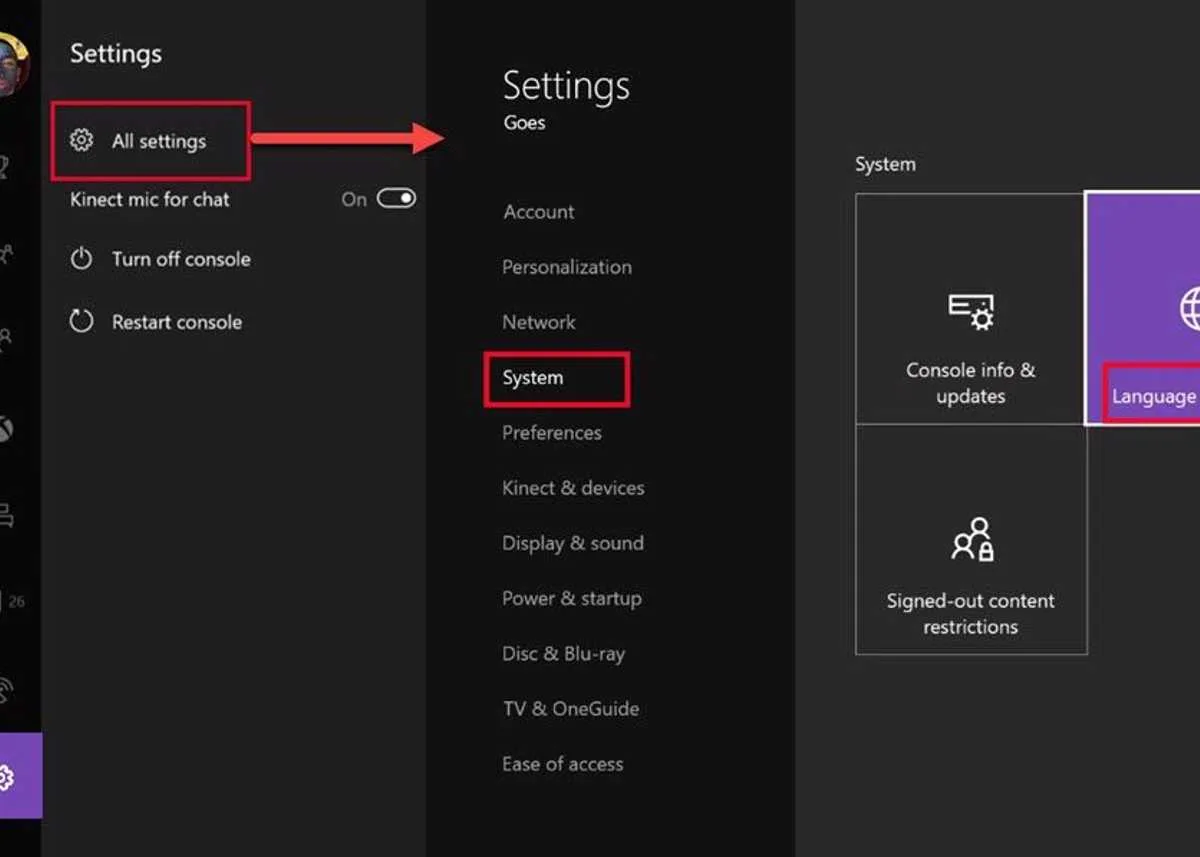
- Go to Settings > All Settings.
- Select System and select Language & Location.
-
Select the Location and Restart.
-
Turn off your Xbox One, by pressing the power button for 8 to 10 seconds
- Then, unplug it for three minutes. Optional: Include your modem router.
- Turn the console back on.
- If an update is available, update it.
- See if you could redeem a code or purchase.
Also, in the Power mode settings, change Instant-on mode to Energy-saving mode. This will prevent your Xbox One to hibernate when turned off.


